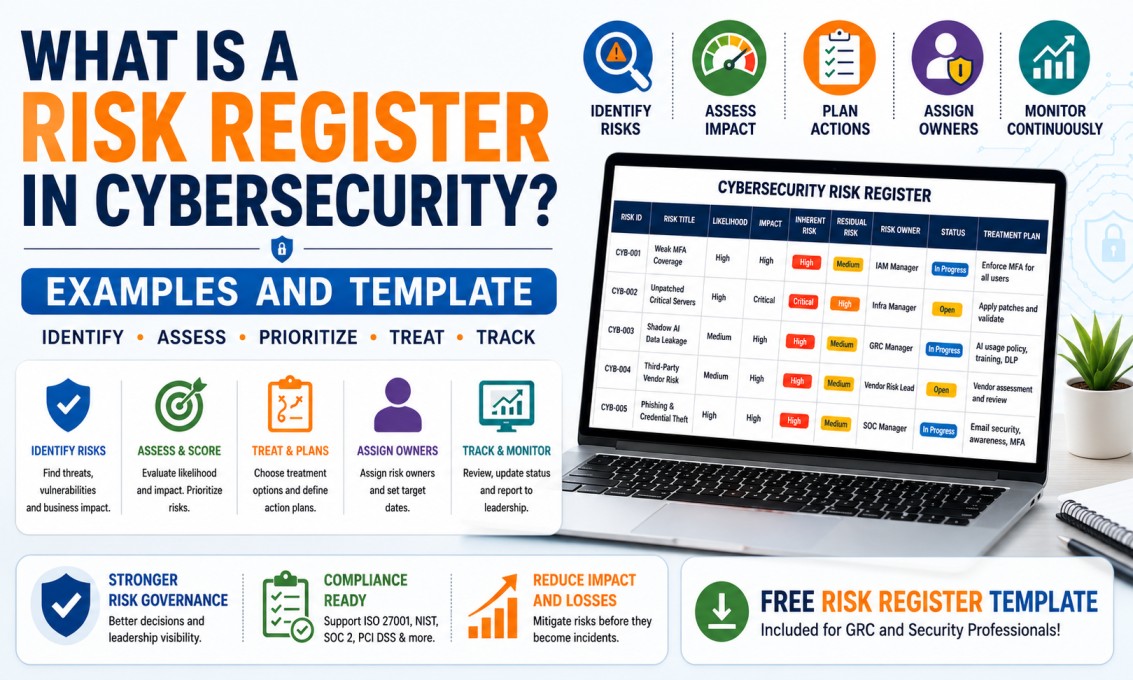
What Is a Risk Register in Cybersecurity? Examples and Template
A cybersecurity risk register is one of the most practical tools used by GRC, risk, audit, compliance and security teams. It helps organizations identify risks, assign owners, prioritize actions, track remediation and communicate risk clearly to leadership.
Cybersecurity risk management is not only about buying tools. Organizations must know what can go wrong, how serious it can be, who owns the risk, what controls are already in place, and what action is required.
This is where a risk register becomes useful. A risk register is a structured document or system that records identified risks and tracks their status from identification to closure, acceptance or continuous monitoring.
Simple definition: A cybersecurity risk register is a central tracker that documents cyber risks, risk owners, likelihood, impact, current controls, risk rating, treatment plan, due date and status.
For GRC professionals, a risk register is a core skill. It is used in risk assessments, audits, compliance programs, management reporting, third-party risk reviews, ISO 27001 implementation, CISM preparation, CRISC preparation and cybersecurity governance.
What Is a Cybersecurity Risk Register?
A cybersecurity risk register is a structured record of risks that may affect an organization’s information systems, data, users, operations, compliance obligations or business objectives.
It helps answer important questions:
- What is the risk?
- Which asset, process or business area is affected?
- What is the threat or weakness?
- What could be the business impact?
- How likely is it to happen?
- How severe would it be?
- What controls already exist?
- What is the remaining risk?
- Who owns the risk?
- What action is planned?
- When will the action be completed?
- Is the risk open, mitigated, accepted or closed?
Example
If an organization does not enforce MFA for remote access, the risk register may record the risk as “Unauthorized access due to weak authentication.” The owner may be the IAM manager, the treatment may be MFA rollout, and the due date may be 60 days.
Why Risk Registers Are Important for GRC Teams
GRC teams use risk registers because cybersecurity risk must be tracked in a structured and accountable way. Without a risk register, risks may be discussed in meetings but forgotten later.
NIST’s risk assessment guidance explains that risk assessments are part of an overall risk management process and help senior leaders determine appropriate courses of action in response to identified risks. A risk register supports this by turning identified risks into trackable items with owners, scores and action plans. :contentReference[oaicite:1]{index=1}
A Risk Register Helps Organizations To:
- Maintain visibility of cybersecurity risks
- Assign accountability to risk owners
- Prioritize remediation based on impact and likelihood
- Track risk treatment progress
- Support audit and compliance evidence
- Report risk to leadership in business language
- Connect technical issues to business impact
- Document risk acceptance decisions
- Monitor third-party and vendor risks
- Support ISO 27001, NIST CSF, SOC 2, PCI DSS and other frameworks
GRC mindset
A risk register is not only a spreadsheet. It is a governance tool that helps the organization decide where to focus time, money and security effort.
Risk Register vs Risk Assessment: What Is the Difference?
Many beginners confuse a risk register with a risk assessment. They are related, but they are not the same.
| Area | Risk Assessment | Risk Register |
|---|---|---|
| Purpose | Identifies and evaluates risks. | Tracks risks after identification. |
| Output | Risk findings, ratings and recommendations. | Central list of risks with owners, treatment plans and status. |
| Timing | Performed periodically or when major changes occur. | Maintained continuously. |
| Owner | Risk, security, audit, GRC or assessment team. | GRC/risk team maintains it; business or technical owners own individual risks. |
| Example | Assessment finds weak MFA coverage for remote access. | Risk register tracks MFA risk, owner, score, treatment plan and due date. |
Simple rule: A risk assessment discovers and evaluates risk. A risk register tracks and manages risk over time.
Key Fields in a Cybersecurity Risk Register
A good risk register should be simple enough to maintain and detailed enough to support decision-making.
| Field | What It Means | Example |
|---|---|---|
| Risk ID | Unique identifier for tracking. | CYB-RISK-001 |
| Risk Title | Short name of the risk. | Weak MFA Coverage for Remote Access |
| Risk Description | Clear explanation of the risk. | Remote users may access systems without strong authentication, increasing account compromise risk. |
| Asset / Process | The system, application, process or business area affected. | VPN, cloud applications, remote access |
| Threat | The potential cause of harm. | Credential theft, phishing, brute-force attack |
| Vulnerability | The weakness that can be exploited. | MFA not enforced for all users |
| Business Impact | What can happen to business operations. | Unauthorized access, data leakage, compliance issue |
| Likelihood | How likely the risk is to occur. | High |
| Impact | How serious the impact would be. | High |
| Risk Rating | Overall risk level based on likelihood and impact. | Critical |
| Existing Controls | Controls already in place. | Password policy, conditional access for some users |
| Risk Owner | Person or team accountable for managing the risk. | IAM Manager |
| Treatment Plan | Action planned to reduce or manage risk. | Enable MFA for all remote users |
| Due Date | Target date for completion. | 30 September 2026 |
| Status | Current progress. | Open, In Progress, Mitigated, Accepted, Closed |
Inherent Risk vs Residual Risk
Two important terms in risk management are inherent risk and residual risk.
Inherent Risk
Inherent risk is the level of risk before considering existing controls. It shows how serious the risk would be if no controls existed or if controls were ignored.
Residual Risk
Residual risk is the risk that remains after controls are applied. It helps management decide whether the remaining risk is acceptable or needs further treatment.
Example
Without MFA, the risk of account compromise may be High. After MFA, conditional access and monitoring are implemented, the residual risk may reduce to Medium or Low, depending on effectiveness.
Likelihood and Impact Scoring Explained
Risk scoring helps teams prioritize. A common method is to score likelihood and impact from 1 to 5, then calculate the risk score.
| Score | Likelihood | Impact |
|---|---|---|
| 1 | Rare | Minimal business impact |
| 2 | Unlikely | Minor impact |
| 3 | Possible | Moderate impact |
| 4 | Likely | Major impact |
| 5 | Almost certain | Severe business impact |
Simple Risk Score Formula
Sample Risk Rating Scale
| Score Range | Risk Rating | Action Needed |
|---|---|---|
| 1–4 | Low | Monitor periodically |
| 5–9 | Medium | Define treatment plan |
| 10–16 | High | Prioritize remediation |
| 17–25 | Critical | Immediate management attention required |
Important: Risk scoring should be consistent across the organization. If every risk is rated Critical, leadership will not know what to prioritize.
Risk Treatment Options
After a risk is identified and scored, the organization must decide how to handle it. There are four common risk treatment options.
1. Mitigate
Reduce the risk by implementing controls.
Example: Enable MFA to reduce account compromise risk.
2. Transfer
Shift part of the risk to another party, usually through insurance or contracts.
Example: Cyber insurance for certain financial losses.
3. Accept
Management formally accepts the risk because the cost or effort to reduce it may not be justified.
Example: Accepting low-risk vulnerability on a non-critical system until next maintenance window.
4. Avoid
Stop the risky activity completely.
Example: Retire an unsupported public-facing application instead of continuing to operate it.
Important warning
Risk acceptance should not be informal. It should be documented, approved by the right authority, time-bound and reviewed periodically.
Sample Cybersecurity Risk Register Template
You can start with a simple spreadsheet. As the program matures, organizations may move to GRC tools such as ServiceNow GRC, Archer, MetricStream, OneTrust, AuditBoard or other platforms.
Beginner tip
If you are preparing for GRC interviews, create your own sample risk register in Excel with 8–10 realistic cybersecurity risks. This can help you explain practical experience confidently.
Practical Cybersecurity Risk Register Examples
Below are practical examples that beginners can use to understand how risk registers are written.
| Risk Title | Risk Description | Likelihood | Impact | Treatment Plan | Owner |
|---|---|---|---|---|---|
| Weak MFA Coverage | Remote access users do not have MFA enforced, increasing risk of account compromise. | High | High | Enable MFA for all remote access users and monitor exceptions. | IAM Manager |
| Unpatched Critical Servers | Critical servers have missing security patches, increasing exploitation risk. | High | Critical | Patch critical servers within approved maintenance window and validate remediation. | Infrastructure Manager |
| Shadow AI Data Leakage | Employees may paste sensitive data into unapproved AI tools without security review. | Medium | High | Create AI usage policy, awareness training and DLP monitoring for high-risk data. | Security Governance Lead |
| Third-Party Vendor Risk | Vendor stores customer data but has not provided security evidence or audit report. | Medium | High | Perform vendor security assessment and request SOC 2 or equivalent evidence. | Vendor Risk Manager |
| Phishing and Credential Theft | Users may enter credentials on fake login pages due to phishing emails. | High | High | Improve email security, phishing awareness, MFA and suspicious login monitoring. | SOC Manager |
| Insufficient Backup Testing | Backups exist but restoration testing is not performed regularly. | Medium | Critical | Implement quarterly backup restoration testing and document evidence. | IT Operations Manager |
Example 1: Weak MFA Coverage Risk
Risk Statement
There is a risk of unauthorized access to remote access systems because MFA is not enforced for all users, which may lead to account compromise, data leakage and compliance issues.
Risk Register Entry
- Asset: VPN and cloud applications
- Threat: Credential theft and phishing
- Vulnerability: MFA not enforced for all remote users
- Impact: Unauthorized access, data exposure, incident response cost
- Likelihood: High
- Impact: High
- Treatment: Mitigate
- Action Plan: Enforce MFA, review exceptions, monitor suspicious login attempts
- Owner: IAM Manager
Example 2: Shadow AI Data Leakage Risk
Risk Statement
There is a risk of confidential data leakage because employees may use unapproved AI tools and enter sensitive business, customer or security information without approval.
Risk Register Entry
- Asset: Customer data, internal documents, support logs, source code
- Threat: Data leakage through unapproved AI tools
- Vulnerability: Lack of AI usage policy and monitoring
- Impact: Privacy violation, contractual breach, intellectual property exposure
- Likelihood: Medium
- Impact: High
- Treatment: Mitigate
- Action Plan: AI usage policy, approved tool list, user training, DLP controls
- Owner: GRC Manager
Example 3: Unpatched Critical Server Risk
Risk Statement
There is a risk of exploitation because critical servers are missing high-severity security patches, which may lead to unauthorized access, service disruption or ransomware impact.
Risk Register Entry
- Asset: Critical Windows and Linux servers
- Threat: Exploitation by external or internal attacker
- Vulnerability: Missing critical patches
- Impact: System compromise, downtime, ransomware risk
- Likelihood: High
- Impact: Critical
- Treatment: Mitigate
- Action Plan: Patch critical systems, validate patch status, document exceptions
- Owner: Infrastructure Manager
How to Maintain a Risk Register
A risk register should not be created once and forgotten. It should be reviewed regularly and updated when risks change.
Good Maintenance Practices
- Review high and critical risks monthly
- Review medium and low risks periodically
- Update status after remediation activities
- Track overdue treatment plans
- Close risks only after evidence is validated
- Document risk acceptance approvals
- Re-score risks when controls improve or threats change
- Link risks to audit findings, incidents and vulnerabilities
- Report top risks to leadership
- Keep ownership clear and current
Practical rule: Every open risk should have an owner, a decision, a target date and a current status. If any of these are missing, the risk is not being managed properly.
Common Mistakes Beginners Make in Risk Registers
Writing Vague Risks
Example: “Cloud risk.” This is too broad. A better risk is: “Public storage bucket may expose customer data due to weak access controls.”
No Risk Owner
If nobody owns the risk, nobody will drive remediation. Every risk must have an accountable owner.
No Treatment Plan
A risk register should not only list problems. It should define what action will be taken.
No Review Date
Risks change. A risk register must be reviewed regularly to remain useful.
Confusing Issue and Risk
An issue has already happened. A risk may happen. Both can be tracked, but they should be described clearly.
Everything Rated Critical
If every risk is Critical, prioritization fails. Use consistent scoring criteria.
Risk Register and Cybersecurity Frameworks
A risk register supports many cybersecurity and compliance frameworks. NIST CSF 2.0 provides guidance for organizations to manage cybersecurity risks and includes the Govern function, which addresses organizational context, cybersecurity strategy and cybersecurity supply chain risk management. :contentReference[oaicite:2]{index=2}
Frameworks Where Risk Registers Are Useful
- ISO 27001: Information security risk assessment and risk treatment
- NIST CSF: Cybersecurity governance and risk management
- NIST RMF: Structured risk management process
- SOC 2: Control gaps, remediation and risk tracking
- PCI DSS: Payment security risk and compliance gaps
- CISM: Information security governance and risk management
- CRISC: IT risk identification, assessment, response and reporting
Risk Register Interview Questions for GRC Roles
| Interview Question | Strong Beginner Answer |
|---|---|
| What is a risk register? | A risk register is a central tracker that records identified risks, owners, likelihood, impact, controls, treatment plans, due dates and status. |
| What fields should a risk register include? | Risk ID, title, description, asset, threat, vulnerability, impact, likelihood, risk rating, controls, owner, treatment plan, due date and status. |
| What is the difference between inherent and residual risk? | Inherent risk is risk before controls. Residual risk is the remaining risk after controls are applied. |
| What are risk treatment options? | Common options are mitigate, accept, transfer and avoid. |
| How do you prioritize risks? | Risks are prioritized based on likelihood, impact, business criticality, regulatory exposure and management direction. |
| Who owns the risk register? | Usually the GRC or risk team maintains the register, but individual risks should be owned by business or technical owners. |
| How often should a risk register be reviewed? | High and critical risks should be reviewed frequently, often monthly. Other risks can be reviewed periodically based on organizational policy. |
| What is risk acceptance? | Risk acceptance means management formally agrees to accept the remaining risk, usually with documented justification, approval and review date. |
Useful External Resources
Related Career Guides
Final Thoughts: Risk Register Is a Must-Have GRC Skill
A cybersecurity risk register is one of the most important practical tools for GRC professionals. It helps convert cybersecurity concerns into structured business decisions.
If you want to build a career in GRC, CISM, CRISC, risk management, compliance or information security governance, learn how to create and maintain a risk register. It will help you speak the language of risk owners, auditors, security teams and management.
Final career message: A strong GRC professional does not only identify risks. They document them clearly, assign owners, define treatment plans, track progress and communicate risk in a way management can act on.
Want to Build Practical GRC and Risk Management Skills?
At CybersecurityTRAIN.com, we help students and working professionals build practical GRC skills through hands-on training in governance, risk management, compliance, ISO 27001, control testing, audit readiness, CISM concepts and interview preparation.
If you want to become job-ready for GRC, risk and compliance roles, explore our GRC training programs and speak with our training advisor.
Explore GRC with CISM Training Explore GRC Self-Paced TrainingCall or WhatsApp: +91 98857 89887
Frequently Asked Questions
1. What is a risk register in cybersecurity?
A cybersecurity risk register is a central tracker that documents cyber risks, owners, likelihood, impact, current controls, treatment plans, due dates and status.
2. Why is a risk register important?
A risk register is important because it helps organizations prioritize risks, assign ownership, track remediation, support audits and communicate cybersecurity risk to leadership.
3. What fields should be included in a risk register?
A risk register should include risk ID, title, description, asset, threat, vulnerability, impact, likelihood, risk rating, existing controls, owner, treatment plan, due date and status.
4. What is the difference between inherent risk and residual risk?
Inherent risk is the level of risk before considering controls. Residual risk is the remaining risk after controls are applied.
5. What are the four risk treatment options?
The four common risk treatment options are mitigate, accept, transfer and avoid.
6. Who owns the risk register?
The GRC or risk team usually maintains the risk register, but individual risks should have assigned business or technical owners.
7. How often should a risk register be reviewed?
High and critical risks should be reviewed frequently, often monthly. Other risks can be reviewed periodically based on organizational policy.
8. Is a risk register required for ISO 27001?
ISO 27001 requires organizations to perform information security risk assessment and risk treatment. A risk register is commonly used to document and track this process.
9. What is a good example of cybersecurity risk?
A good example is weak MFA coverage for remote access, which may increase the risk of credential theft and unauthorized access.
10. Is risk register knowledge useful for GRC interviews?
Yes. Risk register knowledge is very useful for GRC interviews because it shows practical understanding of risk identification, scoring, ownership, treatment and reporting.
11. Can beginners create a sample risk register?
Yes. Beginners can create a simple risk register in Excel using realistic examples such as weak MFA, unpatched servers, phishing risk, Shadow AI, vendor risk and backup testing gaps.
12. What is the difference between risk and issue?
A risk is something that may happen and create impact. An issue is something that has already happened or is currently happening.